
foo_ir2
Last modified: November 5th, 2008
foo_ir2 is a simple plugin to handle infrared/serial port remote controlling of foobar2000.
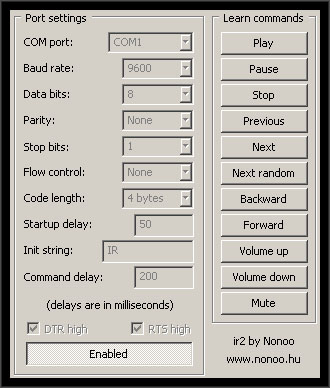
It was made for receivers which send received IR sequences to the serial port in given length chunks. For example, my receiver uses 4 byte chunks.
I love to listen to music in my bed, but I can’t get to sleep while the music is on, so I have to turn it off when needed. :) That’s the reason I need a remote controller to work with my music player.
I tried WinLIRC with the foobar plugin, but I couldn’t get my IR receiver to work with it. Anyway, WinLIRC is a real nightmare to use.
Check out my other foobar2000 plugin, foo_timedisplay!
Download
Current version: v0.1.2
Don’t forget to read installation notes below!
Version history:
- 0.1.2 – command delay now doesn’t affect volume change
- 0.1.1 – command delay now doesn’t affect seeking
- 0.1.0 – initial release
Installation and setup
Extract foo_ir2.dll into foobar2000’s components subdirectory, then restart foobar.
If foobar says that the plugin dll can’t be loaded, initialization error blablabla, then you have to install Microsoft Visual C++ 2008 Redistributable Package (x64 version is here).
First, you have to set your IR receiver’s communication settings. You can find the settings panel in the preferences dialog’s (CTRL+P) Tools submenu. If you’re in doubt, leave everything on the default setting (you can click on the Reset Page button to restore everything to it’s default setting).
Code length determines the length of the byte sequence received from the serial port which is associated with an actual command.
Tip: If you set (for example) Play and Pause commands to two different remote controller buttons, but the plugin always does the same action regardless of which button is pressed, you can try to set a bigger code length (or you have to use another remote controller – I’m using our old VCR’s controller, this gives me the best distance, and all of the buttons work)
Startup delay determines the delay in milliseconds to wait after the COM port has been opened (and DTR/RTS lines have been set). This is necessary if your receiver needs an init string – that would be sent out immediately after the port has been opened, and your IR receiver may not have finished powering up and initializing.
Init string is the character sequence that will be sent out after opening the COM port. My receiver needs the characters “IR” to be sent out to start to working.
Command delay is the time in milliseconds to ignore further commands after a command has been received. If this is too low, you may accidentally trigger a command repeatedly.
DTR/RTS lines are sometimes used for powering IR receivers. For example, my receiver gets it’s power from the DTR line, so it has to be pulled up after opening the COM port.
After you’ve finished with the settings, click on the button Enabled. This will open the COM port and the plugin starts receiving.
Teaching the commands
Click on one of the “Learn commands” buttons, then press a button on your remote controller. If the plugin received the command successfully, the command button goes unpressed automatically.
Don’t forget to click on Save all button to save the settings and learned commands!
You can get detailed info about the plugin’s actions in foobar’s console (View menu -> Console). Check this also when you have problems using the plugin.
 Projects



Hello,
Great utility:)
It would be great if the plugin could turn off/hibernate the computer as well, so you can goto sleep :)
Perhaps turned off by a custon configurable button sequence to prevent accidental turn off?
Perhaps even a switch off after an hour mode, by which time you could fall asleep..
A plug-in for a URL/IR controller would be great (since it’s the only one I have). Perhaps if you know of someone who’s written one????
Thanks…
NJ356
A plug-in for my USB/IR controller would be great. If you know of one that’s been written (right now, only the volume can be controlled, none of the player functionality), I’d appreciate a line being dropped. This would be especially helpful since Winamp 554 is absolutely worthless; quality’s been falling off all during the V5x, but 5.54 is useless.
If this is a duplicate of my previous comment, oops, but the site went all wobbly and my comment never appeared.
Thanx,
NJ356
I will not be able to use volume control in Windows Vista.
i have an integrated IR (Acer L5100 – Integrated Technology Express CIR). how to use your plugin with this IR controller?
if it’s driver provides a serial port in the system, you can try using it with foo_ir2.
Isn’t that reinvention of the wheel? I’m using a chain: Girder 3 (latest free version) -> fb2k (foo_runcmd). What’s the difference?
It doesn’t work with foobar 1.0 :-(
I’m using it with 1.0.3 and works great. Maybe your IR receiver isn’t for this plugin.
Hello, any way to use the notebook embedded IrDA interface?
This is not a serial port like interface and I don’t know how to have your Ir2 working with it.
Many thanks and kind regards,
Andrea
Hi,
A short question regarding the suitable hardware for this plugin. Which RS232 PIN is used to receive DATA from the IR module? On most sites I found that DCD (PIN #1) is used. See for example here: http://www.electronicdesignworks.com/circuits/remote_control_your_computer/remote_control_your_computer.htm
Is it correct to use DCD or RXD must be used (PIN #2)?
Many tnx.
Br,
Barna
Hi, these ir2 receivers use a standard UART so you have to use the RXD pin.
Hi,
Thank you for your prompt reply. Now my IR receiver works perfectly with Foobar2000. I have used an FT232R USB-serial converter IC. It is more easy to use this device as it has a TTLlevel input/output not like the normal serial interface, so it can receive the IR module (TSOP34838) output signal directly. It is also a good advantage to have +5V available on the USB to feed the TSOP. So for the D.I.Y.-ers I really recommend to use FT232R with TSOP34838 to have a compact USB IR receiver.
More info here:
http://www.ftdichip.com/Products/ICs/FT232R.htm
http://www.vishay.com/docs/82489/tsop322.pdf
Br,
Barna
Howdy! I just wish to give an enormous thumbs up for the nice data you¡¦ve gotten right here on
this post. I shall be coming again to your blog for extra
soon.
Thank you for this plugin. In 2023, it still works to control Foobar2000 on an aging HP desktop running Windows 10 with a Logitech Harmony 515 remote. The “pause” button does not work quite right since it resets the playback pointer to the start of the track. I could not get WinLIRC to work, so this was a lifesaver.